
Quick answer
Data storytelling combines data analysis, visualization, and narrative to communicate insights that drive action. It transforms raw numbers into compelling stories — providing context, highlighting what changed and why, and making complex analytical findings accessible and memorable for any audience, from board members to frontline teams.
Data storytelling combines data analysis, visualization, and narrative to communicate insights in a compelling way. It transforms raw data and analytical findings into stories that resonate with audiences, using context, emotion, and clear narrative structure to drive comprehension, engagement, and action on data-driven insights.
Data storytelling addresses a fundamental challenge in business intelligence: technical accuracy alone does not guarantee understanding or action. By framing data insights within narrative structures that humans naturally process, data storytelling transforms analysis from abstract numbers into meaningful information that drives decisions. Effective data stories use data visualization techniques and are often presented through business dashboards that combine visual elements with narrative context.
What is Data Storytelling?
Data storytelling is the structured approach to communicating data insights by combining analytical rigor with narrative techniques. It packages findings within contextual frameworks that explain not only what the data shows, but why it matters and what actions stakeholders should consider based on the evidence.
Effective data stories move beyond simple chart presentation to construct narratives with clear beginnings that establish context, middles that present evidence and build understanding, and endings that articulate implications and recommendations. This structure leverages how human brains process information, making complex analytical findings accessible and memorable.
Core Elements
Data and Analysis: The factual foundation derived from rigorous analytical work, providing evidence that supports the narrative.
Visualization: Visual representations that make patterns and relationships immediately apparent, serving as the visual evidence within the story.
Narrative: The contextual framework that connects data points into a coherent story, explaining causes, effects, and implications.
Components of Effective Data Storytelling
Analytical Foundation
Strong data stories begin with sound analysis:
Question Focus: Start with clear questions that the analysis addresses, ensuring the story has purpose and direction.
Data Integrity: Use reliable data sources and appropriate analytical methods that withstand scrutiny.
Statistical Rigor: Apply correct statistical techniques and acknowledge limitations in data or methodology.
Insight Identification: Distinguish meaningful patterns from noise, focusing on findings that have practical implications.
Visual Design
Visualization serves as the visual evidence supporting the narrative:
Chart Selection: Choose visualization types that clearly communicate specific insights, whether comparisons, trends, relationships, or compositions.
Visual Hierarchy: Direct attention to the most important information through size, color, position, and contrast.
Simplification: Remove unnecessary elements that distract from the core message, following principles of minimalist design.
Annotation: Add explanatory text, reference lines, and highlights that guide interpretation and emphasize key findings.
Narrative Structure
The story framework that gives meaning to data:
Context Setting: Establish why the analysis matters and what questions it addresses, providing background that helps audiences understand significance.
Tension or Conflict: Identify the problem, challenge, or opportunity that the data addresses, creating engagement through unresolved questions.
Evidence Presentation: Walk through the data systematically, building understanding progressively rather than overwhelming with information.
Resolution: Articulate what the data reveals and what actions or decisions the evidence supports.
Call to Action: Conclude with clear recommendations or next steps based on the analytical findings.
Building a Data Story
Understand Your Audience
Tailor stories to specific viewers:
Executive Audiences: Focus on high-level insights, business impact, and strategic implications with minimal technical detail.
Operational Audiences: Emphasize actionable findings relevant to day-to-day decisions and process improvements.
Technical Audiences: Include methodological details, statistical significance, and analytical assumptions.
Mixed Audiences: Layer information so high-level messages are immediately apparent while supporting details are available for those who want them.
Define the Core Message
Identify the single most important insight:
Headline Insight: Articulate the main finding in one clear sentence that captures what audiences should remember.
Supporting Points: Identify 2-3 supporting insights that reinforce or elaborate on the core message.
Evidence Selection: Choose specific data points, trends, or comparisons that provide strongest support for your message.
Structure the Narrative
Organize information for maximum impact:
Opening Hook: Begin with a compelling fact, question, or scenario that captures attention and establishes relevance.
Rising Action: Build understanding progressively, introducing data and context in logical sequence.
Climax: Present the key insight or revelation that the story has been building toward.
Falling Action: Explain implications and consequences of the findings.
Conclusion: Summarize key takeaways and recommended actions.
Design Visual Flow
Create cohesive visual progression:
Consistent Styling: Use uniform colors, fonts, and design elements that establish visual coherence.
Progressive Disclosure: Introduce complexity gradually, starting with simple overviews before detailed breakdowns.
Visual Transitions: Create smooth progression between charts and sections that maintains narrative flow.
Emphasis Through Design: Use visual techniques to highlight insights rather than relying solely on text explanation.
Data Storytelling Techniques
Show, Don't Just Tell
Use visualizations to make insights self-evident:
Before and After: Show changes over time through comparison charts that make improvements or declines obvious.
Highlighted Outliers: Use color or annotation to draw attention to exceptional values or unexpected patterns.
Interactive Exploration: Enable audiences to discover insights themselves through interactive dashboards when appropriate.
Provide Context
Make data meaningful through comparison:
Benchmarks: Show how values compare to targets, historical averages, or industry standards.
Reference Points: Include familiar metrics or analogies that make abstract numbers concrete.
Temporal Context: Show how current situation compares to past periods and expected trends.
Dimensional Breakdowns: Reveal how aggregate findings differ across segments, regions, or categories.
Build Tension
Create engagement through narrative techniques:
Problem Identification: Start by establishing a challenge, gap, or opportunity that requires understanding.
Mystery Reveal: Guide audiences through exploration that builds toward revelation of key insights.
Contrasts: Highlight unexpected findings or contradictions that challenge assumptions.
Stakes Clarification: Explain consequences of action or inaction to establish importance.
Simplify Complexity
Make sophisticated analysis accessible:
Layered Detail: Present high-level findings prominently with supporting detail available but not overwhelming.
Analogies and Metaphors: Use familiar concepts to explain complex analytical ideas.
Visual Hierarchy: Organize information so most important points are immediately obvious.
Incremental Complexity: Introduce concepts progressively rather than all at once.
Applications Across Functions
Executive Reporting
Data stories enable executives to grasp business performance quickly:
Performance Dashboards: Narrative context around KPI visualizations explains what metrics mean and what drives changes.
Strategic Reviews: Comprehensive stories synthesize multiple data sources into coherent strategic assessments.
Board Presentations: High-level narratives communicate business performance and strategic opportunities to governance bodies.
Sales and Marketing
Stories drive revenue functions:
Campaign Performance: Narratives explain what marketing activities drive results and where optimization opportunities exist.
Sales Analysis: Stories reveal which products, segments, and channels perform best and why.
Customer Journey: Narratives trace how customers interact with brands and where conversions happen or fail.
Operations and Finance
Stories improve operational efficiency:
Process Performance: Narratives identify bottlenecks, inefficiencies, and improvement opportunities in operational metrics.
Financial Analysis: Stories explain revenue drivers, cost structures, and profitability patterns across business dimensions.
Budget Reviews: Narratives contextualize spending patterns and variance explanations within business objectives.
Product and Innovation
Stories guide product decisions:
Usage Analytics: Narratives reveal how customers use products and which features drive engagement.
A/B Test Results: Stories explain experiment outcomes and their implications for product decisions.
Market Analysis: Narratives synthesize competitive intelligence and market trends into actionable insights.
Common Pitfalls and Solutions
Pitfall: Too Much Data
Problem: Overwhelming audiences with every available metric and chart.
Solution: Focus ruthlessly on data that supports the core message. Archive supporting detail in appendices rather than main narrative.
Pitfall: No Clear Message
Problem: Presenting data without articulating what it means or why it matters.
Solution: Define the headline insight before building the story. Ensure every element supports that central message.
Pitfall: Poor Visualization Choices
Problem: Using complex or inappropriate chart types that obscure rather than reveal insights.
Solution: Match visualization types to data relationships. Test visualizations with representative audiences to ensure clarity.
Pitfall: Lack of Context
Problem: Presenting numbers without reference points that make them meaningful.
Solution: Include benchmarks, historical comparisons, and dimensional breakdowns that provide interpretive context.
Pitfall: Burying the Insight
Problem: Making audiences work to understand what data reveals.
Solution: State insights explicitly through annotation, highlighting, and clear narrative explanation. Design should make insights obvious.
Tools for Data Storytelling
Presentation Platforms
Microsoft PowerPoint: Traditional presentation software with extensive design capabilities for linear narratives.
Google Slides: Cloud-based presentation tool enabling collaboration and easy sharing.
Prezi: Non-linear presentation platform for dynamic, zooming narratives.
Beautiful.ai: AI-powered presentation tool with design automation.
Visualization and BI Tools
Tableau: Business intelligence platform with strong visualization and dashboard storytelling features.
Power BI: Microsoft analytics tool with report and dashboard narrative capabilities.
Looker: BI platform with integrated storytelling and exploration features.
Flourish: Specialized tool for creating animated and interactive data visualizations.
Narrative Platforms
Shorthand: Digital storytelling platform optimized for scrolling narratives with embedded visualizations.
Scrollama: JavaScript library for scroll-driven story interactions.
Observable: Collaborative platform for creating interactive data narratives with JavaScript.
Best Practices
Start with Why
Begin by establishing why the analysis matters before presenting what the data shows. Context precedes content.
One Story, One Message
Resist the temptation to communicate every finding. Each story should have a single core message with supporting points.
Design for Skimming
Most audiences skim before reading deeply. Ensure key insights are apparent from headlines, visualizations, and annotations alone.
Test with Real Audiences
Validate stories with representatives of target audiences to ensure clarity and appropriate detail level.
Iterate Based on Feedback
Refine narratives based on questions and confusion from initial presentations. Misunderstanding reveals needed improvements.
The Future of Data Storytelling
AI-Enhanced Narratives
Machine learning will increasingly assist storytelling through automated insight discovery, natural language generation that describes findings, and dynamic narrative personalization based on audience characteristics.
Interactive Storytelling
Digital platforms enable audiences to explore data within guided narrative frameworks, supporting both structured storytelling and self-directed discovery.
Real-Time Stories
Automated narrative generation will create stories from streaming data, providing current insights without manual intervention.
Integrated Communication
Data storytelling capabilities will integrate directly into analytical tools, enabling seamless transition from analysis to communication without separate presentation development.
Data storytelling transforms analytics from technical exercise into business impact by ensuring insights reach audiences in forms they can understand and act upon. As data volumes grow and analytical sophistication increases, the ability to distill complex findings into compelling narratives becomes increasingly valuable.
How FireAI Enables Data Storytelling
FireAI automates the hardest parts of data storytelling — data gathering, visualization, and narrative generation — so business users can focus on the strategic message:
AI-Generated Narrative Summaries
When you query data in FireAI, the system doesn't just return a chart. It generates a plain-language summary: "Revenue grew 14% MoM to ₹1.8 crore, driven by a 23% surge in the North region. South region declined 5%, primarily due to delayed distributor payments." This narrative layer transforms raw numbers into story-ready insights.
Pre-Built Dashboards as Story Frameworks
FireAI's pre-built dashboards for P&L, sales performance, and inventory serve as story structures. Each dashboard section tells part of the business story — what happened (descriptive), why it happened (diagnostic), and what might happen next (predictive). Connect Tally or any of 250+ data sources and the story framework populates automatically.
Indian Business Storytelling Examples
- Board Presentation (₹75 crore pharma distributor, Mumbai): The CFO uses FireAI to generate monthly MIS narratives from Tally data. Instead of 6 hours of Excel formatting, the system produces charts with AI-written commentary — "Debtor days increased from 45 to 52, driven by 3 large hospital accounts exceeding credit terms. Recommended action: initiate collection calls for ₹3.2 crore in 60+ day receivables."
- Investor Update (Series A startup, Bengaluru): A SaaS founder generates monthly investor updates by asking FireAI: "Summarise key metrics for the last month — ARR, burn rate, customer count, NRR." The AI produces a narrative-ready summary with charts that drop directly into the investor email.
- Team Review (₹12 crore retail chain, Chennai): Store managers receive weekly performance stories via WhatsApp — not raw numbers, but contextualised narratives: "Your store's average basket value increased ₹85 this week (12% above chain average), driven by the new combo offer."
Step-by-Step: Build a Data Story with FireAI
- Connect your data source — Tally, database, or spreadsheet
- Ask the key question — "What were the biggest changes in our business this month?"
- Review AI-generated narrative — FireAI surfaces top insights with written explanations
- Pin key charts — Build a dashboard with the 3-5 most important visualizations
- Add context and recommendations — Layer your strategic interpretation on top of the AI-generated insights
- Share the story — Deliver via email, WhatsApp, or presentation link
FireAI vs Manual Data Storytelling
| Aspect | Manual Approach | FireAI-Assisted |
|---|---|---|
| Data gathering | 2-4 hours (export, clean, merge) | Automatic from 250+ sources |
| Chart creation | 1-2 hours in Excel/PPT | Instant with auto-selected chart types |
| Narrative writing | 1-2 hours per report | AI-generated summaries in seconds |
| Update frequency | Monthly (too time-consuming for more) | Daily or real-time |
| Consistency | Varies by person | Standardised structure, personalised content |
Ready to act on your data?
See how teams use FireAI to ask in plain language and get analytics they can trust.
Explore FireAI workflows
Go from this topic into product features and solution paths that match what you read here.
Topic hub
Dashboard And Reporting
Practical content on KPI dashboards, executive reporting, trend analysis, charts, and reporting automation.
Explore hubFrequently asked questions
Related in this topic
What is BI Reporting? Definition and Examples
BI reporting is how organizations create and share reports from business data. Learn what it means, common report types, and how to choose BI reporting tools.
What is a Business Dashboard? Types and Examples
A business dashboard is a visual interface that displays KPIs, metrics, and data insights in real-time. Learn how business dashboards work, which types exist, and how to design effective dashboards for executives, managers, and teams.
AI Report Generator: Create Reports in Minutes
An AI report generator builds business reports automatically — pulling data, creating charts, writing summaries, and scheduling delivery. See how it works, top tools, and real use cases.
What is Data Democratization? Benefits and Challenges
Data democratization enables all employees to access and analyze business data without technical barriers. Learn how data democratization works, which benefits it provides, and how to implement it to transform organizations into data-driven cultures.
From the blog
What Is a Data Silo and Why Is It Slowing Down Your Business?
Data silos are silently costing Indian businesses time, money and decisions. Here is what they are, why they form and how to break them for good with FireAI.

Why Your Data Presentations Don’t Work And How To Fix Them With an Insight-First Framework
Most companies drown leaders in data but starve them of decisions — because they present metrics instead of insights. This post reveals the consultant’s insight-first framework (and the 15 rules top firms use) to turn dashboards into decisive action.
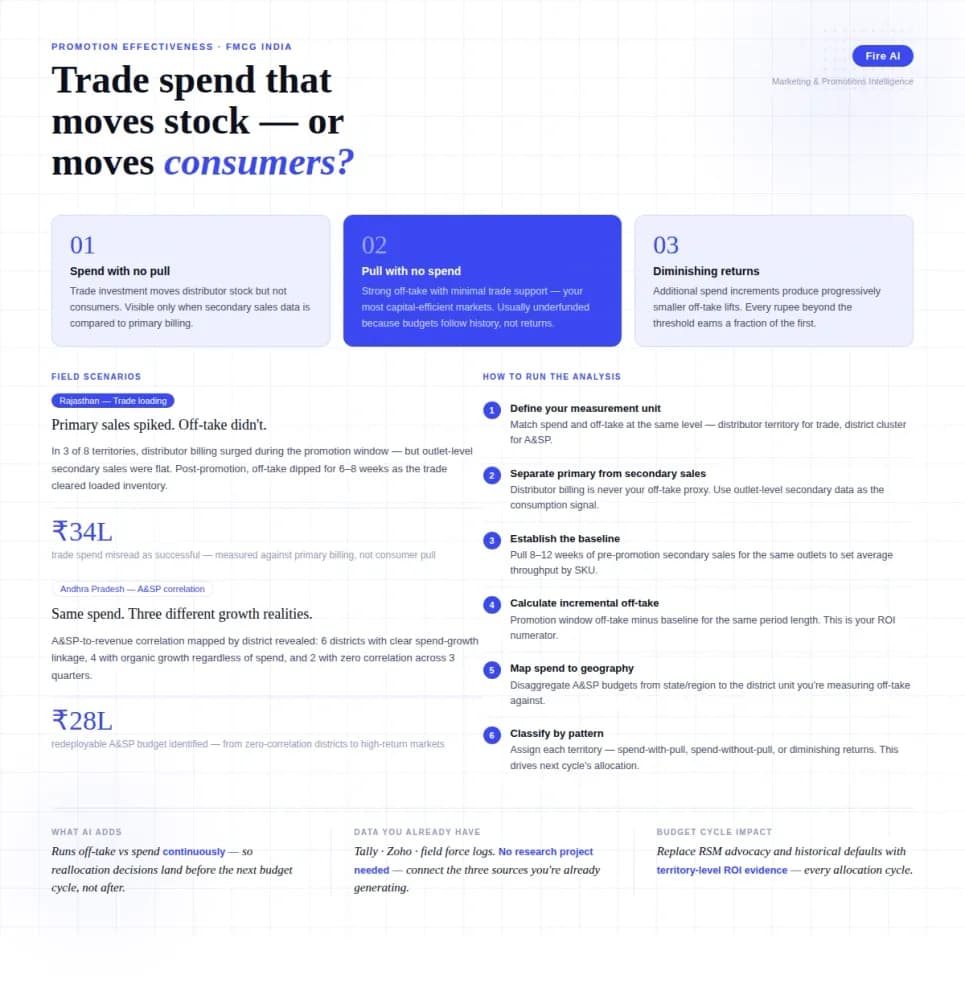
Measuring Promotion Effectiveness: A Data-Driven Guide for FMCG Marketers
FMCG brands in India spend 15–25% of gross revenue on trade promotions and A&SP (advertising and sales promotion) every year. Most can tell you how much they spent. Very few can tell you what it returned. The problem isn't a lack of data — it's that the data lives in disconnected places. Trade spend sits in finance. Off-take data lives with the distributor or field team. A&SP budgets are tracked in a marketing spreadsheet. No single view ties promotional investment to consumer pull at the outlet level. The result is a budget cycle where last year's spend allocation becomes next year's default, because no one has the numbers to argue for something different. This guide walks through how FMCG marketing and trade teams can build a promotion effectiveness framework that actually connects spend to outcome — not just channel-level assumptions.